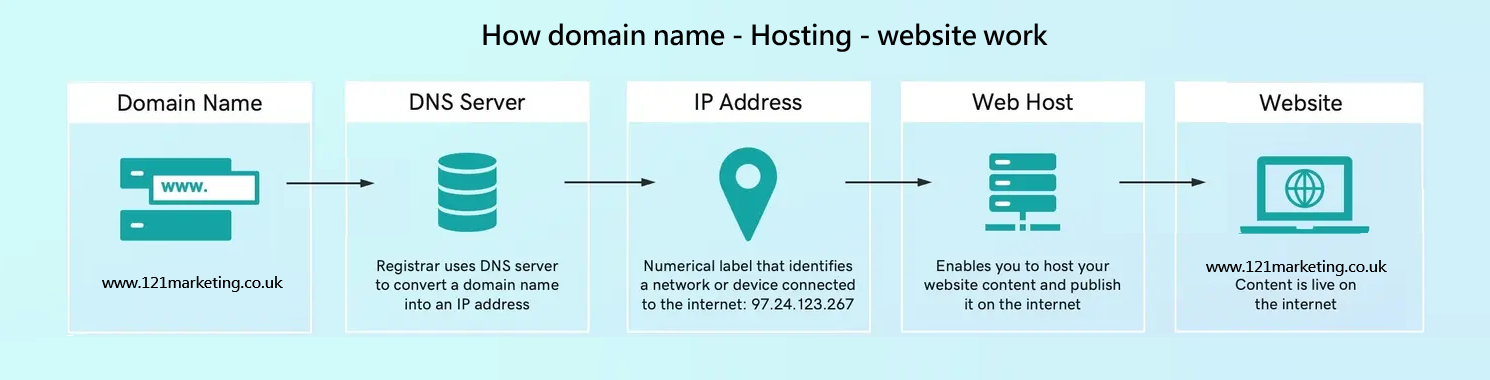
To build a website, you need the following 4 most fundamental prerequisites to support your website running in good order:
- A domain name (your address)
- A web hosting (where files live)
- A platform (like WordPress or a website builder)
- Content of website (layout, text, images, videos, etc)
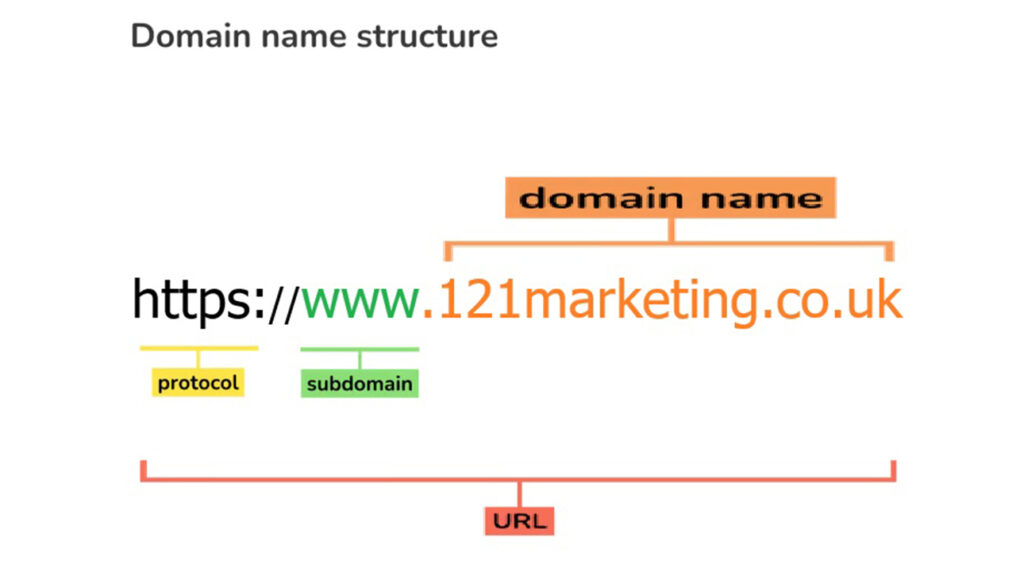
A domain name is a unique online address used to identify websites and digital services—for example, google.co.uk. It acts as a simple, memorable label that replaces the long and complex numerical IP addresses (such as 142.250.186.174) that computers use to locate servers. Because remembering strings of numbers is impractical, the Domain Name System (DNS) was created to translate human‑friendly domain names into machine‑readable IP addresses. This system makes the internet easy to navigate and allows users to reach websites simply by typing a name into their browser.
A domain name is also a key part of a URL (Uniform Resource Locator), forming the central identity of your online presence. Whether you run a business, a personal brand, or an organisation, your domain name becomes your digital address—something customers can easily recognise and return to. To use a domain, you must register it and pay a fee for exclusive ownership. It just costs £15.59 per year or £25.58 for two years, depending on the domain extension and registrar (special offer might be available if you purchase 3+ years).
How a Domain Name Works
1. You enter a domain name—for example, 121marketing.co.uk—into your web browser.
2. Your request is sent to DNS servers, which function like the internet’s global phone book.
3. The DNS looks up the domain and finds the corresponding IP address associated with that name.
4. Your browser uses the IP address to connect to the correct web server and load the website.
This entire process happens in milliseconds, allowing users to access websites instantly without ever seeing the underlying technical steps. A domain name is therefore not just a digital label—it is the foundation of your online identity, credibility, and accessibility.
We will help you to create a domain name account in www.godaddy.com at the beginning, and what you need to do is to renew the domain name before it expires. The cost for 1 year domain name register is just £15.59 / year (you might have discount if you register for 2 or 3 years in one go).
| To register domain name for 1 year | £15.59 / 1 year |
| To register domain name for 2 years | £25.58 / 2 years |
| To register domain name for 3 years | £31.58 / 3 years |

Hosting
Hosting is the service that stores your website’s files—such as code, images, and written content—on a powerful, always‑on computer called a server. This makes your website accessible to anyone on the internet through a web browser. Think of hosting as renting digital space for your website, much like renting a storage unit for physical items. The hosting provider manages the server’s security, speed, and connectivity, ensuring your site stays online 24/7. When someone types your domain name into their browser, the hosting server delivers your website’s files directly to them.
Key Aspects of Hosting
Servers & Data Centres: Your website files are stored on physical or virtual servers located in secure data centres equipped with reliable power, cooling systems, and high‑speed internet.
Accessibility: Hosting ensures your website is available globally, handling traffic and responding to requests from users’ browsers.
Services Provided: Most hosting companies offer storage space, bandwidth, security features, backups, and technical support to keep your site running smoothly.
How Hosting Works
1. You first register a domain name for your business.
2. You choose a hosting plan and connect your domain to the hosting provider’s server.
3. You upload your website files or build your site using a CMS (Content Management System).
4. When someone visits your URL, their browser requests the files from your server, and the host delivers the website to them.
Types of Hosting
Shared Hosting: The most affordable option, where multiple websites share the same server resources.
VPS (Virtual Private Server): A dedicated portion of a server, offering more control and performance than shared hosting.
Dedicated Hosting: You have an entire physical server exclusively for your website.
Cloud Hosting: Your site runs on a network of servers, providing excellent scalability, speed, and reliability.
The hosting for our client is free of charge for the first year, from the 2nd year, we ask just £30 / year (including VAT)
| Hosting for the 1st year | Free of charge |
| Hosting for the 2nd year | £30 / year (including VAT) |
| Hosting for the 3rd year | £30 / year (including VAT) |
Most welcome website platform
A website’s platform is the core software, tools, and infrastructure — such as WordPress — that provides the environment needed to build, manage, and operate a site. It supports everything from content creation through a CMS to hosting and performance, ensuring your website is accessible, functional, and aligned with your goals. In many ways, it’s the digital engine powering your online presence, shaping ease of use, available features, scalability, and overall cost.
Choosing the right platform directly affects how easily you can update your site, its security, performance, and long‑term expenses, making it a critical decision for any online project. WordPress, for example, is one of the most popular choices for small businesses and startups because it allows users with basic technical knowledge to update content through a simple dashboard — no coding required. This ease of use helps new companies manage their websites independently and reduce the need for ongoing professional IT support.
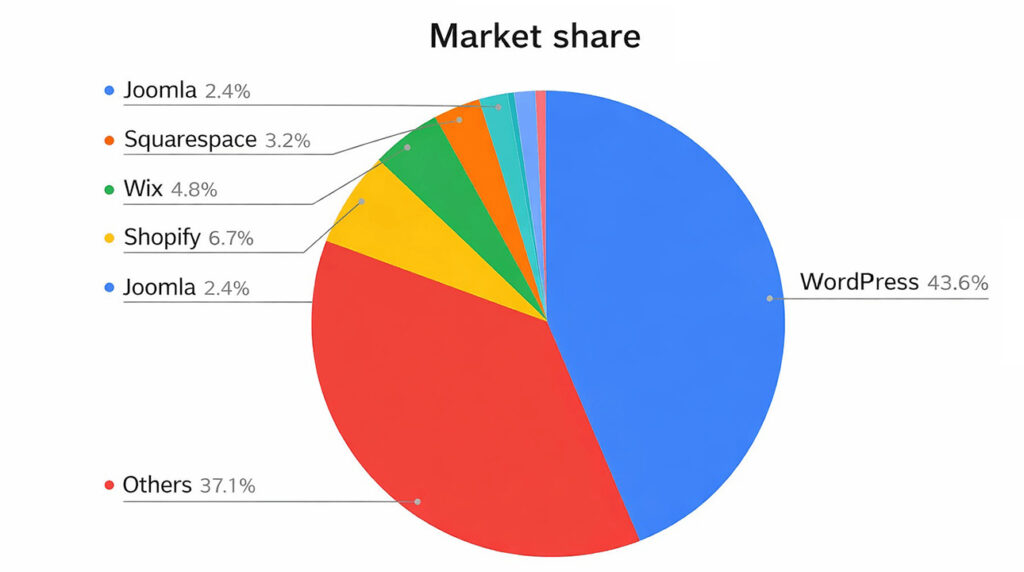
We can see that WordPress is a leading platform that dominates over 43.6% of websites market and left the others far behind in 2025:
| Platform | CMS market share | Number of website |
| WordPress | 43.6% | 835 million |
| Shopify | 6.7% | 5.17 million |
| Wix | 4.8% | 8 million |
| Squarespace | 3.2% | 4.4 million |
| BigCommerce | 1% | 41,776 |
| Drupal | 1.2% | 47,203 |
| Joomla | 2.4% | 919,707 |

Content of website
Website content includes every visual, textual, and auditory element that shapes how a site looks, feels, and communicates. This can range from written copy and images to videos, graphics, and audio clips. Together, these components form the backbone of a website’s structure and message, guiding visitors through information in a clear and engaging way. Effective content is supported by thoughtful layout elements such as headers, footers, menus, and sidebars, which help users navigate smoothly and understand the hierarchy of information.
Strong website content does more than fill space; it reinforces a brand’s identity and builds trust with visitors. When content is relevant, well‑organized, and aligned with user needs, it enhances the overall experience and encourages people to stay longer, explore further, and take meaningful actions. Whether the goal is to inform, educate, or entertain, high‑quality content ensures that the message is delivered with clarity and purpose.
In today’s digital landscape, users expect websites to provide value quickly and intuitively. This makes strategic content creation essential for any business or organization. By combining compelling messaging with thoughtful design and multimedia elements, website content becomes a powerful tool for communication, engagement, and long‑term online success. For more , website layout, please see our 39 website templates design in Portfolio channel formore details.
SSL (optional)
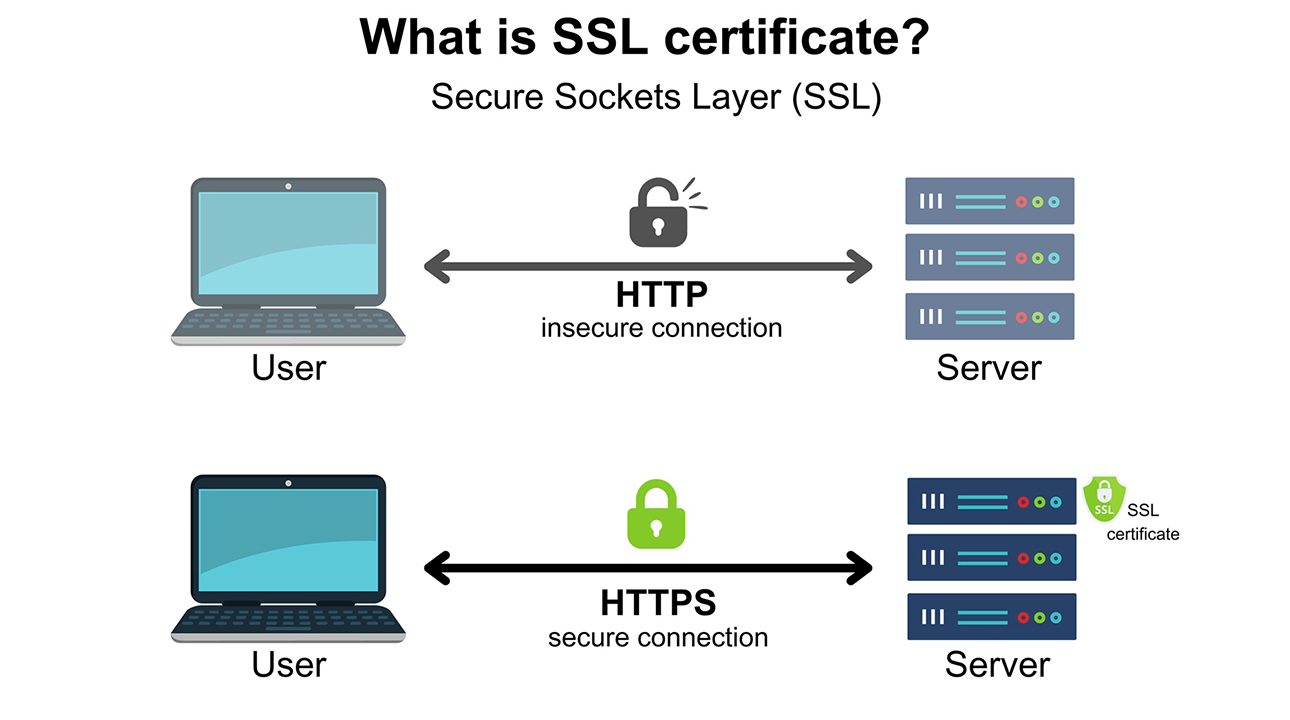
SSL (Secure Sockets Layer) is a security protocol for encrypting internet communications, it is commonly used to refer to the technology that secures websites (HTTPS), enabling private data transfer, authentication, and integrity for things like credit card transactions and logins. A SSL certificate is a digital file that activates this security, showing a padlock icon and “https://” in the browser, verifying the site’s identity and encrypting data between the user’s browser and the server.
Key Functions
Encryption: Scrambles data so interceptors see gibberish, protecting sensitive information like passwords and credit card numbers.
Authentication: Verifies that the website you’re visiting is the real deal, not an imposter.
Data Integrity: Ensures data isn’t altered or corrupted during transmission.
How it Works (Simplified)
Handshake: Your browser and the server exchange information to establish a secure connection.
Certificate Exchange: The server presents its SSL certificate for verification.
Encryption Key: A unique key is generated to encrypt all subsequent communication.
Modern Usage
HTTPS: Websites using SSL/TLS have “https://” in their URL instead of “http://”.
Ubiquitous: It’s now standard for securing all web traffic, not just e-commerce.
Certificates: You’ll often hear about SSL Certificates, which are the files that enable this security for a domain.
| SSL security cost for 1 year | £30 / year (including VAT) |
| SSL security cost for 2 years | £60 / 2 years (including VAT) |
| SSL security cost for 3 years | £90 / 3 years (including VAT) |

Business email (optional)
Having a business email address that uses your own domain name (e.g., you@yourcompany.com) is an essential step in establishing professional credibility and building trust with customers.
Core Benefits
Legitimacy: Customers are far more likely to trust and engage with a domain‑based email than a generic address such as yourcompany@gmail.com.
Brand Visibility: Every email you send reinforces your brand name and encourages recipients to visit your website.
Enhanced Security: Business email hosting typically includes enterprise‑grade spam filtering, malware protection, and secure infrastructure designed to safeguard your communications. Improved Organisation: You can create dedicated aliases—such as sales@, support@, or info@—to route enquiries to the right teams while maintaining a consistent, professional image.
Popular Email Hosting Providers
Most providers offer easy setup tools to help you purchase a domain or connect an existing one. For example, GoDaddy (www.godaddy.com) provides professional email hosting, often bundled with domain registration or website‑building services.
How to Set Up Your Business Email
1. Choose and Register a Domain: Use a registrar like GoDaddy to secure a domain that reflects your brand.
2. Select an Email Host: Choose a provider based on your budget and required features such as storage, security, and app integration.
3. Verify Domain Ownership: Your email host will supply a verification code (TXT or MX record) to add to your domain’s DNS settings.
4. Create Mailboxes and Aliases: Set up individual accounts for staff and create aliases for general functions.
5. Configure Your Devices: Connect your new email address to your preferred desktop client (Outlook, Apple Mail) or mobile device. Business email cost for 1 year £12 / 1 year (including VAT) Business email cost for 2 year £24 / 2 year (including VAT)
| Business email cost for 1 year | £12 / 1 year (including VAT) |
| Business email cost for 1 years | £24 / 2 year (including VAT) |